
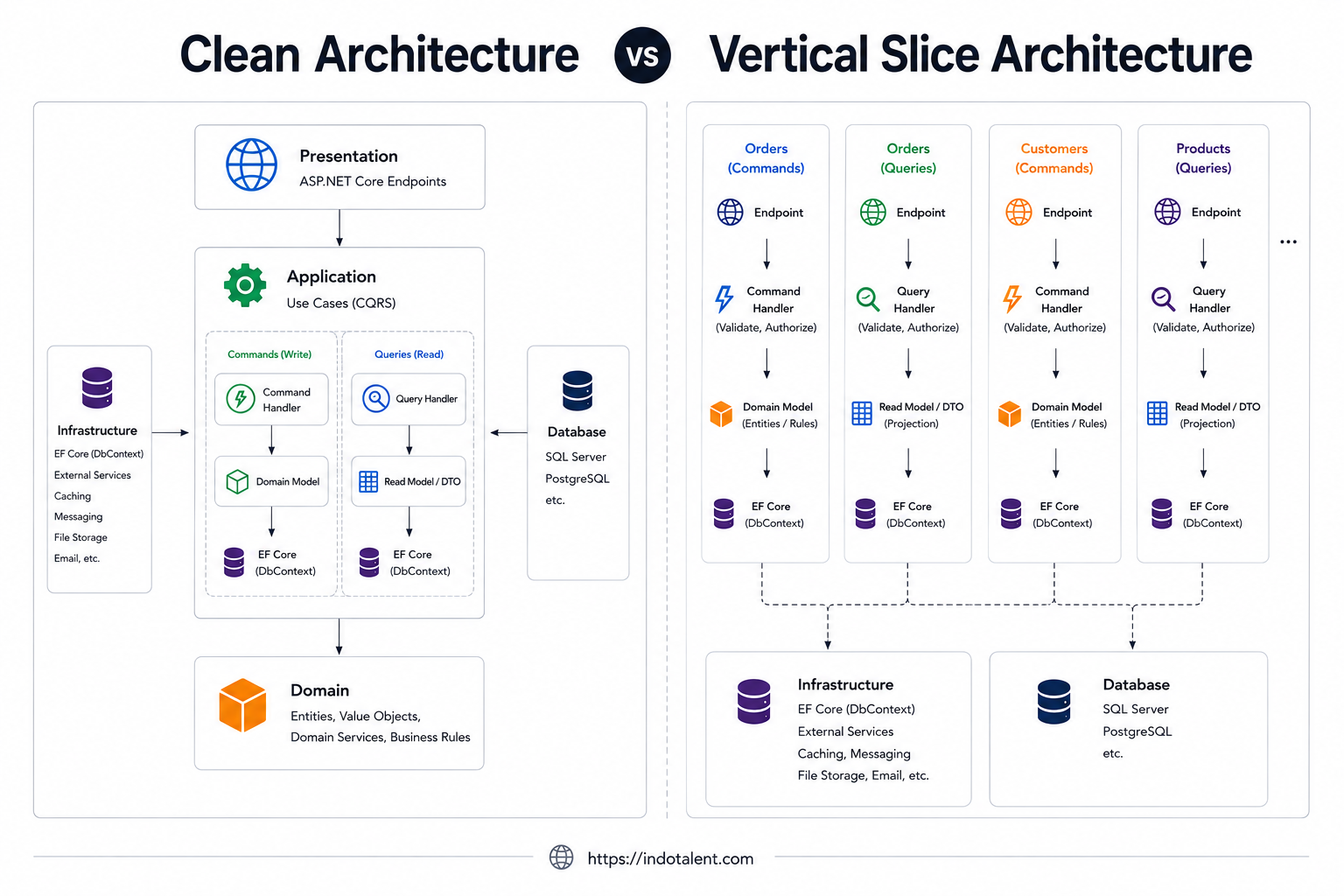
How should you organize a .NET application as its features grow? Clean Architecture starts with the boundaries around business rules. Vertical Slice Architecture starts with the behavior a user wants to perform. Understanding both makes it easier to choose useful boundaries without adding layers just to follow a template.
An Introduction to Clean Architecture
Clean Architecture separates business policy from delivery and storage details. Its dependency rule directs source-code dependencies inward: the business core should not need to know which web framework or database serves it. The original explanation is Robert C. Martin's The Clean Architecture.
A common .NET interpretation uses four areas:
- Domain: entities and business rules that do not depend on HTTP or persistence frameworks.
- Application: use cases and contracts for the outside capabilities those use cases require.
- Infrastructure: implementations for persistence, email, files, and other external services.
- Presentation: endpoints or UI adapters that translate input into use-case calls and format output.
Infrastructure implements interfaces owned by the core; dependency injection connects the implementations at startup. Runtime calls can reach the database while source dependencies still point toward the core. Folder names alone do not enforce this rule, and neither four projects nor a generic repository is mandatory.
What those boundaries buy you
Consider an order approval rule that must remain consistent across an API and an administrative UI. Placing the rule behind an application use case gives both entry points the same behavior. Keeping external integrations behind meaningful contracts lets tests exercise that behavior without starting every external dependency.
The cost is additional navigation, mappings, and contracts. Adding a field may involve the endpoint model, application request, entity, and persistence mapping. That work is worthwhile when the boundaries protect important rules; it is harder to justify when every abstraction merely forwards a call. Database integration tests remain necessary even when unit tests substitute a repository.
What Is Vertical Slice Architecture?
Vertical Slice Architecture groups the code for a use case, such as Create Todo or Get Todo List, so its behavior is easy to find and change. The central goal is cohesion within a slice and limited coupling between slices. Jimmy Bogard describes this approach in Vertical Slice Architecture.
A slice can contain request and response models, validation, and a handler. Its endpoint and UI may sit alongside it in a broader feature folder. Shared entities, database configuration, authentication, and logging can remain outside that folder. VSA does not mean duplicating the whole application stack for every request.
The feature folder pattern
This illustrative layout organizes individual actions within a business feature:
/Features
  /Orders
    /CreateOrder
      CreateOrderCommand.cs
      CreateOrderHandler.cs
      CreateOrderResponse.cs
      CreateOrderValidator.cs
    /GetOrder
      GetOrderQuery.cs
      GetOrderHandler.cs
  /Customers
    /RegisterCustomer
      RegisterCustomerCommand.cs
      RegisterCustomerHandler.cs
A small use case can keep its related types in one file; a larger one can use several files. Neither is a requirement. A feature folder can also contain several operations, as the Todo example below does. The useful question is whether developers can locate a behavior and understand its dependencies quickly.
Minimal APIs, MediatR, and CQRS
Minimal APIs can translate HTTP requests into commands or queries, and MediatR can dispatch those messages to handlers. CQRS separates write operations from read operations. These are compatible choices, but VSA does not require them: a controller can call a use case directly, and separate command/query models do not require separate databases or event sourcing.
One operation may need only a straightforward EF Core query. Another may call a domain object or an external service. Shared business rules still deserve a single, well-defined home; feature ownership is not a reason to copy important invariants.
Clean Architecture vs Vertical Slice Architecture
The following comparison describes common implementations. Clean Architecture emphasizes dependency boundaries, while VSA emphasizes the organization of changes. Treat these as design dimensions rather than mutually exclusive templates.
| Concern | Clean Architecture | Vertical Slice Architecture |
|---|---|---|
| Code organization | Separate core use cases from infrastructure and presentation adapters. | Group behavior by feature or individual use case. |
| Dependencies | Core policy does not depend on outer implementation details. | Minimize dependencies between slices; choose infrastructure boundaries deliberately. |
| Feature changes | A change may cross several layers and their contracts. | Much of a change stays within its feature; shared schema or rules can still affect others. |
| Data access | Infrastructure implements persistence contracts used by the core. | A handler may use DbContext directly or a meaningful abstraction. |
| Testing | Test domain rules and use cases independently, then test adapters and integrations. | Test a slice's observable behavior, including database integration where used. |
| Abstraction cost | Contracts and mappings add work but can protect stable policy. | Fewer mandatory layers; shared behavior needs deliberate refactoring. |
| Useful conditions | Important domain rules and multiple delivery or infrastructure adapters. | Frequent feature changes and use cases with different implementation needs. |
Can you combine them?
Yes. You can organize Application use cases into feature folders while keeping Domain independent and implementing persistence contracts in Infrastructure. This combines feature-oriented navigation with inward dependency rules. By contrast, the Todo handlers below reference a concrete infrastructure DbContext, so they illustrate VSA with direct EF Core access, not a strictly isolated Clean Architecture application core.
For a new Todo field, trace the actual change: the form, request model, handler mapping, entity, and possibly database migration. VSA helps keep the feature-specific parts nearby; it does not eliminate changes to shared storage. Clean Architecture makes the boundaries explicit but does not require unrelated layers to change for every request.
Study Clean Architecture in an Indotalent Project
For a complete example developed by Indotalent, explore the ASP.NET Core Inventory Order Management System on GitHub. The repository documents a monolithic Clean Architecture implementation using CQRS, MediatR, Repository Pattern, and EF Core.
Its top-level layout includes Core, Infrastructure/Infrastructure, and Presentation/ASPNET. Use those as navigation points: start with core contracts and use cases, follow their infrastructure implementations, and then inspect how presentation invokes them. The README describes a headless API with a Razor Pages and Vue.js front end.
Choose one inventory or order operation and follow its request, handler, repository interaction, and response. Compare the number and purpose of its boundaries with the Todo flow below. Both projects use CQRS and MediatR; those libraries alone do not determine the architecture. See the repository for the full source and setup instructions.
A Real Vertical Slice: Todo in Blazor CRM
The Todo feature in Indotalent's Blazor CRM puts its API endpoints, HTTP client service, CQRS operations, validators, and Razor components under Features/Utilities/Todo. The following tree lists selected files from that implementation; shared persistence types remain outside the feature:
Features/Utilities/Todo/
  TodoEndpoint.cs
  TodoService.cs
  Cqrs/
    CreateTodoHandler.cs
    CreateTodoValidator.cs
    GetTodoListHandler.cs
    GetTodoByIdHandler.cs
    UpdateTodoHandler.cs
    UpdateTodoValidator.cs
    DeleteTodoByIdHandler.cs
    CreateTodoItemHandler.cs
    UpdateTodoItemHandler.cs
    DeleteTodoItemHandler.cs
  Components/
    TodoPage.razor
    _TodoDataTable.razor
    _TodoCreateForm.razor
    _TodoUpdateForm.razor
    _TodoItemDataTable.razor
Data/Entities/
  Todo.cs
  TodoItem.cs
Infrastructure/Database/
  AppDbContext.cs
  MsSQL/Configuration/
    TodoConfiguration.cs
    TodoItemConfiguration.cs
1. Understand Todo and its child items
Todo has a name, description, start/end times, completion flag, automatic number, and a TodoItemList collection. Each TodoItem has its own name, description, timing, and completion state, plus TodoId and a navigation back to its parent. The EF Core configuration establishes a one-to-many relationship and configures cascade deletion. Both entities inherit soft-delete support from BaseEntity. AppDbContext converts deleted tracked entities into updates with IsDeleted set to true and filters deleted records from queries. A configured database cascade therefore does not by itself guarantee that deleting a Todo will physically remove its children; child behavior depends on tracking and the shared deletion flow.
2. Follow the request from the Blazor form
Blazor Todo form
  -> TodoService (HTTP client)
  -> /api/todo endpoint
  -> IMediator.Send(command or query)
  -> use-case handler
  -> AppDbContext / EF Core
  -> response DTO -> API response wrapper -> UI
The create form validates its model and calls TodoService.CreateTodoAsync. That service builds a RestSharp POST request to api/todo and uses the shared response-handling infrastructure. This is a UI-facing HTTP client service, not an extra business-service layer between a handler and persistence.
Startup mounts feature endpoints under /api; TodoEndpoint adds the /todo group and requires an authenticated user through the JWT bearer scheme. Its create endpoint sends CreateTodoCommand and wraps the result with a 201 status. Authentication does not by itself establish per-record ownership rules.
3. Inspect the create command and handler
The following excerpts show the real command declaration and the persistence portion of CreateTodoHandler. They are not a standalone file: request/response definitions, constructor, imports, and the preceding automatic-number generation are omitted. autoNo is produced by that earlier code.
public record CreateTodoCommand(CreateTodoRequest Data)
    : IRequest<CreateTodoResponse>;

// Inside Handle(CreateTodoCommand request, CancellationToken cancellationToken):
var entity = new Data.Entities.Todo
{
    AutoNumber = autoNo,
    Name = request.Data.Name,
    Description = request.Data.Description,
    StartTime = request.Data.StartTime,
    EndTime = request.Data.EndTime,
    IsCompleted = request.Data.IsCompleted
};

_context.Todo.Add(entity);
await _context.SaveChangesAsync(cancellationToken);

return new CreateTodoResponse
{
    Id = entity.Id,
    Name = entity.Name
};
The handler owns the write operation and injects AppDbContext directly. Its response exposes the created identifier and name rather than returning the tracked entity. This makes the operation straightforward to locate, while coupling its persistence behavior to EF Core and the application's database infrastructure.
4. Read through a separate query
GetTodoListHandler uses AsNoTracking(), sorts newest first by CreatedAt, and projects into response DTOs. The excerpt below is shortened: the full projection also includes the automatic number, description, times, and audit fields.
public record GetTodoListQuery()
    : IRequest<List<GetTodoListResponse>>;

// Shortened excerpt from GetTodoListHandler.Handle:
return await _context.Todo
    .AsNoTracking()
    .OrderByDescending(x => x.CreatedAt)
    .Select(x => new GetTodoListResponse
    {
        Id = x.Id,
        Name = x.Name,
        IsCompleted = x.IsCompleted
        // Other response fields omitted here.
    })
    .ToListAsync(cancellationToken);
Read and write operations use the same DbContext but separate handlers and models. That is a practical CQRS arrangement without a second database. The current list query returns all matching records; pagination would be a future change to this use case, not an existing feature of the shown query.
5. Check where validation actually runs
CreateTodoValidator validates CreateTodoRequest: the name is required and has a maximum length set by GlobalConsts.StringLengthShort. UpdateTodoValidator also requires an ID. The create form constructs its validator, connects it to the MudBlazor form, and calls Validate() before submitting.
The backend registers validators and a MediatR validation behavior, but that behavior resolves IValidator<TRequest> for the dispatched message type. Here the message is CreateTodoCommand, which wraps CreateTodoRequest. Registering the request validator does not automatically validate the wrapped Data. The inspected Todo endpoint and handler do not explicitly invoke it either.
When adapting this pattern, add a validator for the command that delegates to its data validator, or explicitly validate the payload at the API boundary. This is an implementation recommendation, not behavior demonstrated by the current Todo code. UI validation improves feedback but should not be treated as server-side enforcement.
6. Follow updates, deletion, and child operations
UpdateTodoHandler finds the entity by ID, updates its editable fields, saves, and returns a response with Success. A missing entity returns Success = false. DeleteTodoByIdHandler similarly returns false if the ID is missing; otherwise it calls Remove and SaveChangesAsync. The endpoints translate those outcomes into the application's API response wrapper rather than explicitly returning HTTP 404 in these branches.
The HTTP client uses POST for /api/todo/update and /api/todo/delete/{id}. Child operations have their own handlers and routes under /api/todo/todo-item, including /update and /delete/{id}. The child create handler assigns the supplied TodoId to the new item. These are the project's actual route conventions, not a requirement imposed by VSA.
This feature demonstrates both cohesion and shared infrastructure: the Todo behavior is nearby, while entities, EF mappings, authentication, and response handling are reused. A class called TodoService does not invalidate the architecture; its responsibility and dependencies matter more than its suffix.
Design Pitfalls and a Practical Testing Strategy
- Adding pass-through abstractions: introduce a repository or business service when it owns a useful contract or rule, rather than requiring one for every handler.
- Sharing feature internals: avoid having unrelated slices depend on one another's request types or handlers. Extract stable rules deliberately.
- Assuming registration equals validation: test the request type actually dispatched, including calls that bypass the UI.
- Confusing authentication with authorization: verify access to individual records when the business requires it.
- Ignoring persistence behavior: shared SaveChanges logic, schema constraints, and relationships can affect multiple slices.
For Todo, useful integration scenarios include creating and reading an item, updating completion state, handling missing IDs, adding a child, and checking deletion behavior against the configured database and shared persistence logic. Check the response wrapper and status codes clients actually receive. Test required-name validation through both the form and direct API requests; the latter can expose the command/request mismatch described above.
Unit tests remain useful for pure rules and validators. Database-backed handler tests should exercise the relational provider behavior they depend on. In a Clean Architecture implementation, add focused tests for core use cases and contracts, while retaining integration coverage for the actual persistence adapters.
FAQ
Is VSA the same as CQRS or MediatR?
No. VSA organizes behavior, CQRS separates reads and writes, and MediatR dispatches messages. They can be used together or independently.
Does Clean Architecture require Repository Pattern?
No. The important constraint is the direction of dependencies. Persistence contracts can take different forms; a generic repository is one possible design, not the definition of Clean Architecture.
Can a VSA project have services and shared entities?
Yes. Todo uses an HTTP client service and shared data entities. Keep each abstraction's purpose explicit, and avoid forcing every operation through unnecessary forwarding layers.
Is the Blazor CRM Todo feature a Clean Architecture example?
It is the VSA example in this guide. Its handlers depend directly on infrastructure's AppDbContext. Use the linked Indotalent inventory repository to explore the separate Clean Architecture implementation.
Can either approach be used in a monolith?
Yes. Code organization and dependency rules do not dictate deployment topology. Extracting a feature into a service still requires decisions about data ownership, transactions, and communication.
Key Takeaways
- Clean Architecture protects core policy with inward dependencies; VSA groups code around behavior.
- Feature folders and Clean Architecture boundaries can coexist.
- The Indotalent inventory repository provides a complete Clean Architecture reference.
- Blazor CRM Todo demonstrates feature-local UI, HTTP endpoints, CQRS handlers, and direct EF Core access.
- Verify validation, authorization, and persistence behavior from actual execution paths, not architecture labels.
